How many structures do I need, and how do I name them?
Your mode decides how many structures you use, and you name each one on the Structures step.
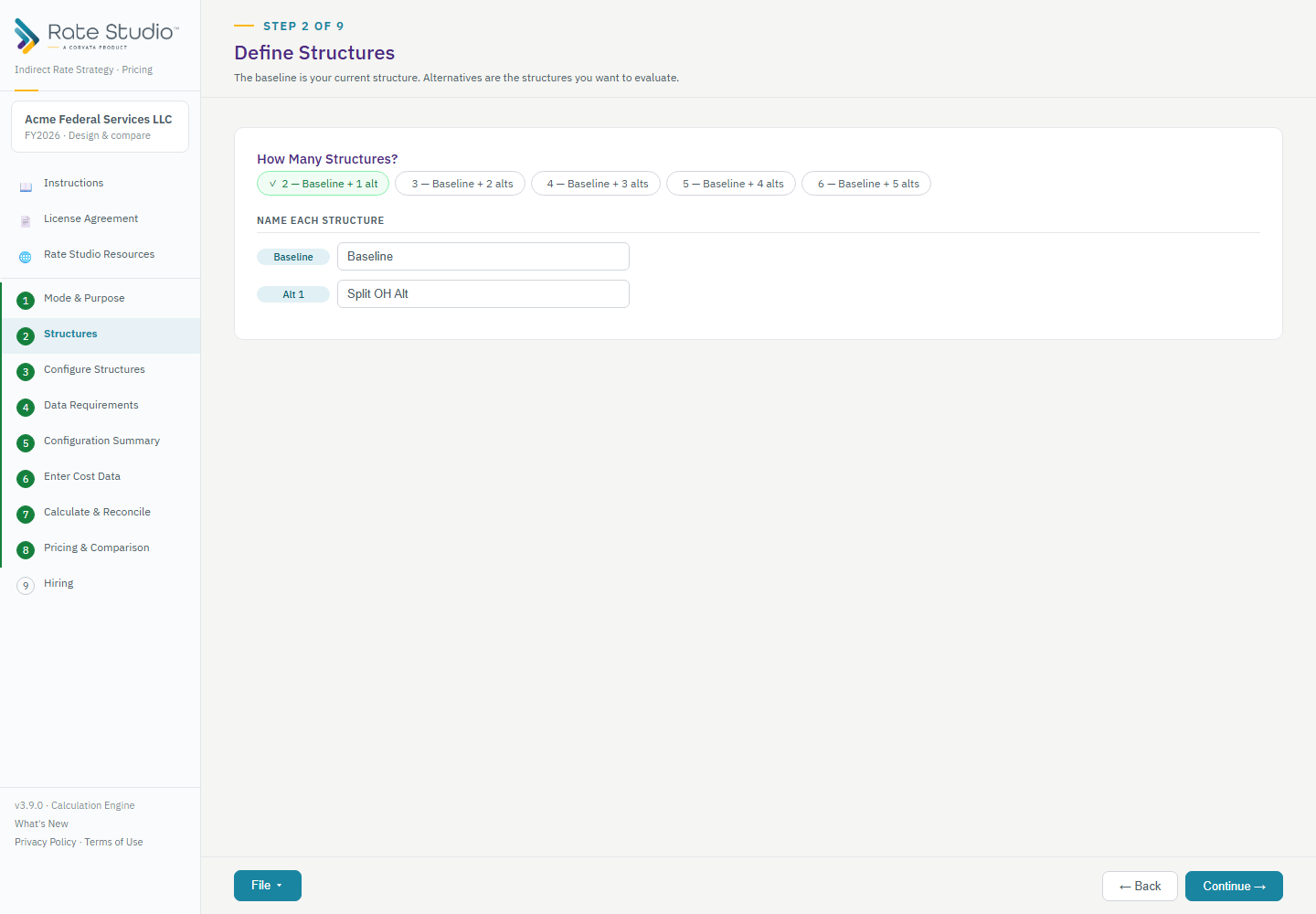
How many
- Calculate Single Set of Rates: always one structure, the Baseline.
- Perform a What-If Analysis: a Baseline and one What-If.
- Model Multiple Rate Structures: a Baseline plus the alternatives you choose. Your plan may limit how many (see What are my plan limits? (tiers vs. editions)).
To change the answer, go back to Mode & Purpose and choose a different mode.
Name them
- Open the Structures step.
- Name each structure. The Baseline is your current structure, the way you run it today. You can rename it.
- Use names that mean something to you, for example "Split OH by Division" or "Add IT Pool". The names appear on every later tab, report, export and comparison.
- Select Continue to configure the structure.
If this doesn't work: if you can't add as many structures as you want, see A mode or option is unavailable on my plan.
Watch: Define structures, name each structure from 0:40
Full guide section: Structures
Related: How do I add alternative structures to compare? | Which mode should I use: Single Set, What-If, or Multiple Structures? | How do I set up fringe?