How do I compare two periods (budget vs actual)?
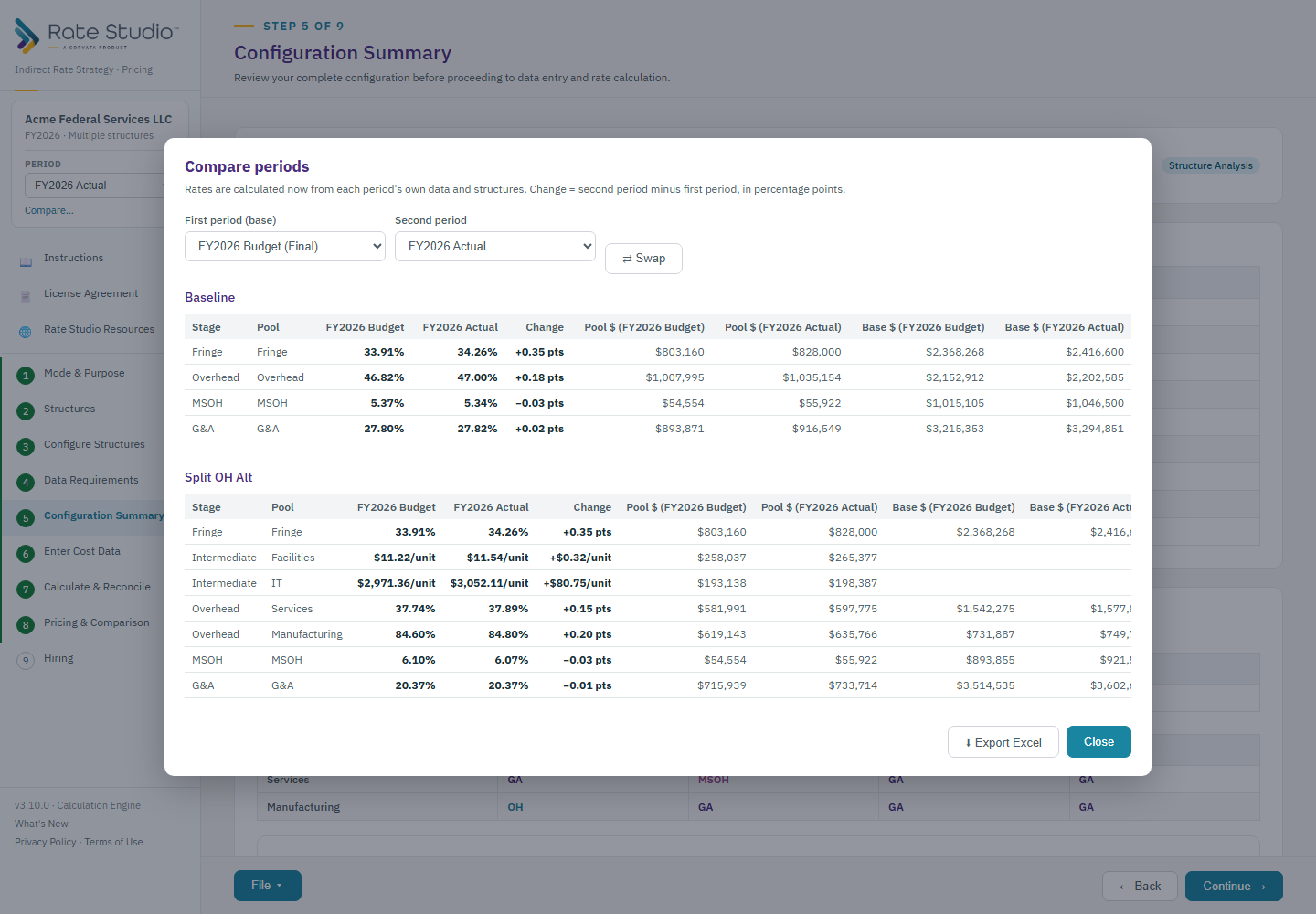
Compare calculates two periods from their own data and shows them side by side.
Steps
- Open the Period box in the sidebar and choose Compare.
- Pick the two periods.
- Read every stage side by side: fringe, each intermediate and overhead pool, MSOH and G&A. The change is shown in percentage points, with the pool and base dollars behind it.
- Export the comparison to Excel from the same window.
Same structure for a budget and its actuals
A budget and an actual for the same year should use the same structure, so that a variance has one cause: the dollars. If they differ, Compare shows a warning that names each difference, and Configure Structures warns you when you change one. Rates are not a like-for-like comparison in that case (see Compare warns that the structures differ).
Comparing different years can use different structures. That is normal when a contractor restructures at the start of a fiscal year, and stages that exist in only one period are labeled.
If this doesn't work: see Compare warns that the structures differ if Compare warns that the structures differ.
Watch: Periods, compare from 1:32
Full guide section: Periods
Related: What is a period, and how do I start a new one? | How do I lock a period as Final, and how do I unlock it? | Compare warns that the structures differ