How do I find the maximum salary I can offer for a billing rate?
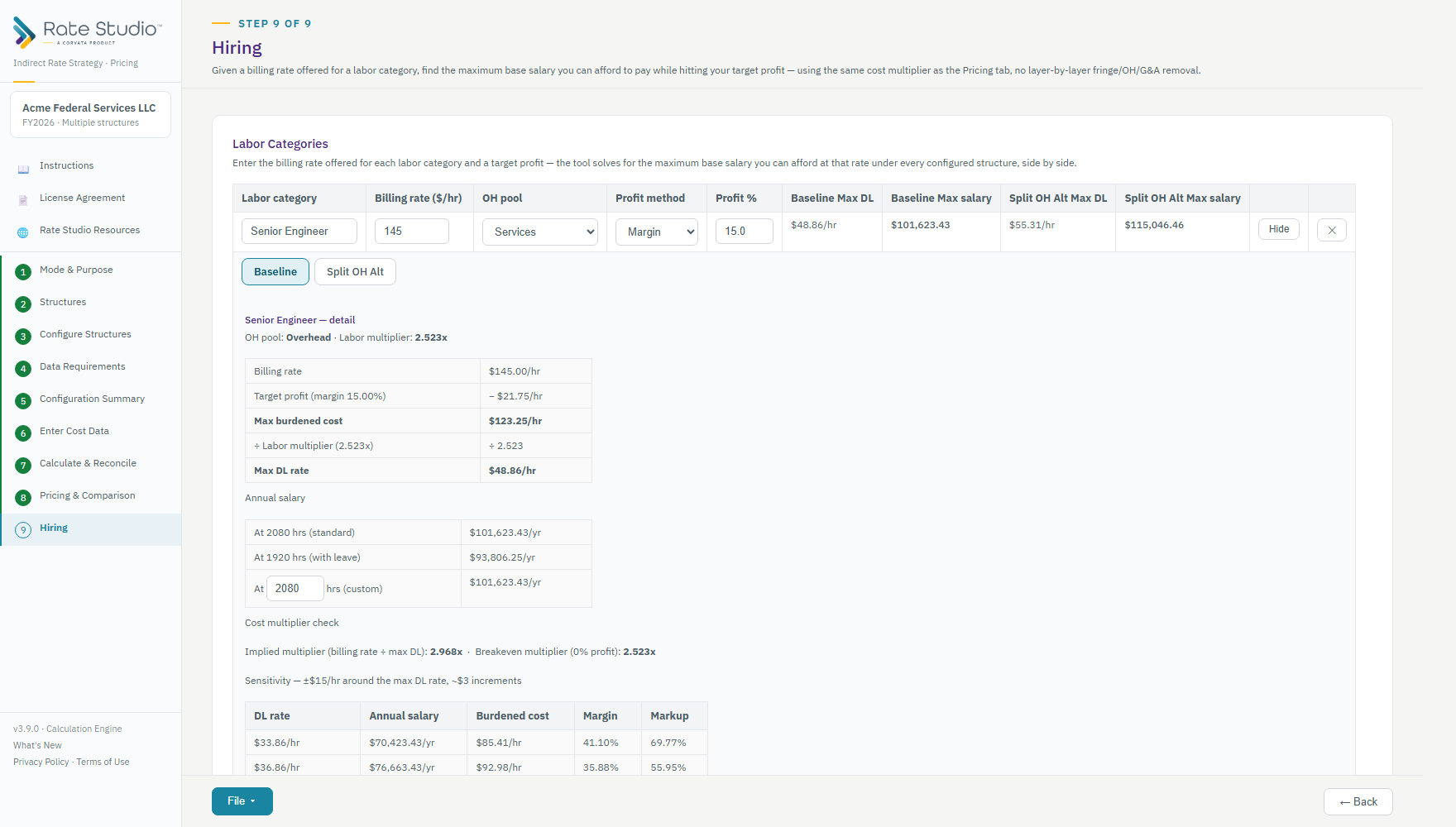
Hiring works the opposite way from Pricing. Given a billing rate, it finds the highest salary you can pay and still hit your target profit. It uses the same cost multiplier that Calculate & Reconcile shows (see What are cost multipliers?).
Steps
- Open the Hiring screen.
- For each labor category, enter the billing rate a customer will pay, the overhead pool, and your target profit.
- Rate Studio solves for the highest hourly rate and the highest annual salary you can offer and still hit that profit.
- Select Detail on a row to see the breakdown: annual salary at standard hours (2,080), with leave (1,920) and custom hours, a cost-multiplier check, the breakeven point at zero profit, and a sensitivity table showing how a few dollars more or less per hour changes margin and markup.
Good to know
- The salary assumes full billable use, so treat it as a ceiling.
- Every structure is shown side by side, and the Detail panel has a tab for each structure.
- Export to Excel or PDF from the File menu.
If this doesn't work: if Hiring is blocked, see 'Cost data not used by this structure' red message.
Watch: Pricing and cost multipliers, Hiring from 2:24
Full guide section: Hiring
Related: What are cost multipliers? | How do I build time-and-materials billing rates? | How do I read What-If results?